
An Easy Way to Exchange Facebook Accounts
This article was automatically translated from Japanese by AI. Read the original Japanese version →
Table of Contents
This isn't about programming, but it's a handy feature that doesn't seem to be very well known, so I decided to write a post about it.
The Scenario
When you're at an event or study group, you'll often want to exchange contact information with someone you just met for the first time. Have you ever tried exchanging Facebook or other SNS accounts instead of phone numbers or email addresses?
Depending on the person, some people nowadays communicate far more through social networks like Facebook, Twitter, or LINE than by phone or email.
This method is meant for that exact situation: "exchanging Facebook accounts with someone standing right in front of you."
Right now, most of you probably do: "ask their name on the spot" → "search that name on Facebook" → "find their account in the search results."
Typing out someone's name is pretty tedious, isn't it? It's way too easy to make a typo. Plus, surprisingly often there are multiple people with similar names, making it a hassle to pick the right person out of the search results.
How to Do It
Actually, the Facebook app on Android and iOS (probably) comes out of the box with a feature built specifically for this scenario.
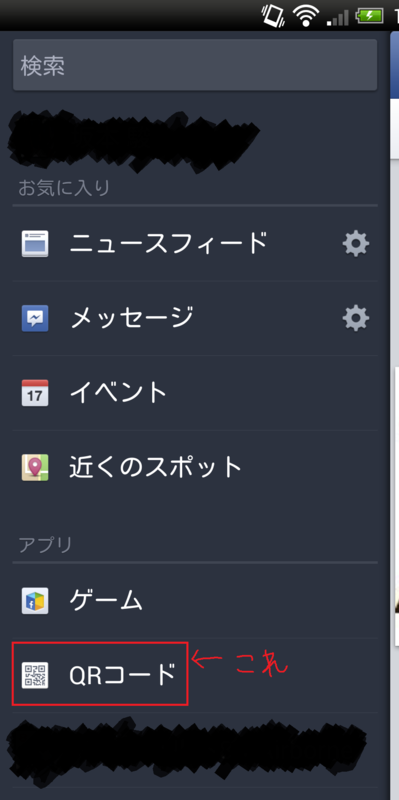
It's a built-in Facebook mini-app called QR Code.
(Here's the Android screen, pixelated for privacy)
When you open it, it takes you to a screen like this. (Also pixelated)
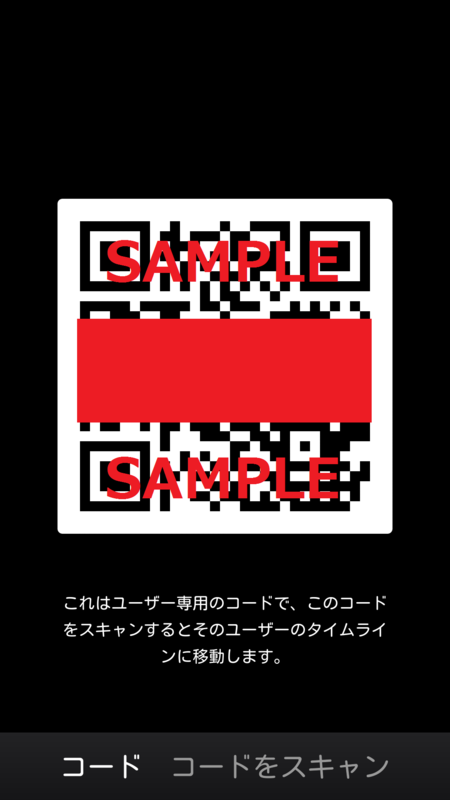
Scanning this QR code takes you straight to that user's profile page. Also, in the bottom right of the screen there's a "Scan Code" option—tapping it switches you into QR code scanner mode.
Once you're on their profile page, all that's left is to send a friend request.
Taking It Further
This same idea works for exchanging accounts on Twitter and other services too. After all, it's just turning your profile page URL into a QR code and scanning it with a QR code reader.
Saving an image of your profile URL as a QR code beforehand and putting a shortcut to it on your home screen is pretty convenient. That said, the other person will rarely have one prepared themselves, so in practice they'll usually scan yours to add you first, and you'll add them back from there.
Wrapping Up
Make good use of handy features and enjoy a smoother Facebook life!