
A Simple (Dirty) Way to Boost Impressions on Twitter
This article was automatically translated from Japanese by AI. Read the original Japanese version →
Table of Contents
Here's a simple way to boost your impressions on Twitter. I ran an experiment for a little under a week and confirmed that it actually works.
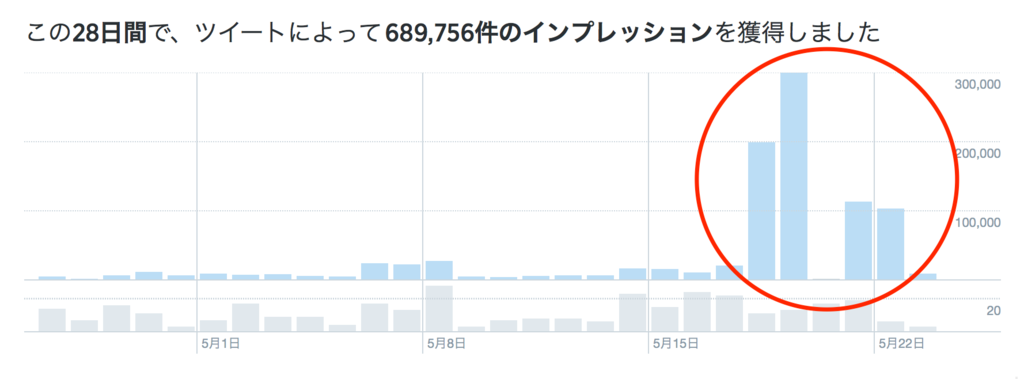
You can see that right after I started the experiment on May 18, impressions spiked abnormally for two days.
May 20 showing 0 is probably just a measurement glitch. Even the two days after that hit around 100,000 impressions, which is pretty massive compared to my usual numbers.
First, What Are Impressions on Twitter?
On Twitter, impressions are the number of times your tweets are displayed to other users. Normally, that's roughly the same as how many times they appear in people's timelines, so the number grows if you have lots of followers or get lots of retweets.
How to Easily Increase Impressions
I'll cut straight to the chase. Here are the steps:
- Find a tweet that's racking up a ton of retweets.
- Send a reply to that tweet.
I'll walk through the details step by step.
Why This Method Increases Impressions
First, let's look at why this works.
By design, whenever someone clicks into a tweet's detail view on Twitter, the replies to that tweet are displayed right alongside it.
This happens regardless of whether anyone has any relationship with the person replying (like following them or not). In other words, if you reply to a tweet seen by 100,000 people, your reply gets seen by 100,000 people too.
In reality, simply scrolling past a tweet and opening its detail view aren't quite the same thing, but let's not sweat the small stuff.
How to Find Tweets Blowing Up with Retweets
Now that you know why it works, here's how to actually find tweets that are taking off.
I set up a bookmark like this:
https://twitter.com/search?f=tweets&q=lang%3Aja%20min_retweets%3A5000
This URL uses Twitter's search feature to find tweets matching these filters:
- "lang:ja" => Japanese
- "min_retweets:5000" => Retweeted at least 5,000 times
Most of the time, that's plenty. If you want to go even further, it's also worth checking out this Twitter account:

What to Write in Your Replies
Next up is what kind of replies to send. I tried to keep these rules in mind:
- Don't sound like spam
- Be polite and respectful to the person you're replying to
- Don't try too hard to be clever—just go with your gut reaction
As long as you stick to those points, people probably won't brush you off as annoying.
Here are a few real examples of what I sent:
@ponzholic At this point I'm scared to even boot up my Windows PC at home!! ((((;゚Д゚)))) *shivering*
— kazasiki (@kazasiki) May 18, 2016
@Rick_Reloaded Honestly, I'm almost impressed by how cleverly that baits the reader.
— kazasiki (@kazasiki) May 18, 2016
@LlittleTomBoy pic.twitter.com/5xf0u7r6LS
— kazasiki (@kazasiki) May 17, 2016
Wrap-Up
To be honest, this was mostly an experiment, and if you ask whether boosting my impressions brought any real benefits, not really.
Profile visits doubled, sure, though my follower count didn't budge—which might depend on the kind of account you run.
Still, I figured it's useful to be aware that Twitter has this kind of loophole-like behavior, which is why I wrote this post.
Also, it seems there really are shady accounts out there exploiting this exact behavior to drop spam ads for marketers.
@ponzholic
— BTS (@btslovebts2) May 18, 2016
The drawings keep escalating too, hilarious lol https://t.co/WRSTeRn3M7