
Running Out of AWS Switch Role History Slots, So I Started Using AWS Extend Switch Roles
This article was automatically translated from Japanese by AI. Read the original Japanese version →
Table of Contents
Lately I've been posting about non-programming topics so much that people might start forgetting this blog is written by an engineer.
So today, I'll talk about something in that wheelhouse for a change. Recently, I started using "AWS Extend Switch Roles."
AWS Extend Switch Roleschrome.google.com
AWS Extend Switch Roles – Get this Extension for 🦊 Firefox (ja)addons.mozilla.org
Tool Overview
First, let me give a quick overview of "AWS Extend Switch Roles."
Anyone who uses AWS regularly and deals with permission management probably knows about the Switch Role feature, and knows you can use it right from the AWS Web Console. While Switch Role in the AWS Web Console is convenient, it has one subtly annoying limitation: it only keeps up to 5 shortcuts in your history. You run out of slots way too fast.
AWS Extend Switch Roles is a browser extension that expands that limit dramatically. Rather than just keeping history, it lets you save Switch Role configs in a format similar to your ~/.aws/config file. When you rely on the default history, older entries quietly drop off and you end up wasting tons of time hunting down the settings you had before—this helps you avoid all of that.
Honestly, reading the official README is the fastest way to understand how it works, so I won't go too deep into the setup details here.
Handy Features
Even just that is super useful, but the tool also packs a few other handy features.
First, it gives you much more freedom over colors than the AWS Web Console's Switch Role, which can help if you distinguish roles by color.
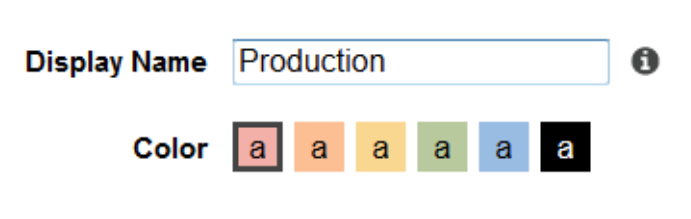
The AWS Web Console only lets you pick from the 6 colors shown above, whereas AWS Extend Switch Roles lets you specify any RGB hex value (FFFFFF). If your team shares a convention—like this color for production, that color for staging—nobody gets confused when glancing over at someone else's screen. (Does that actually happen?)
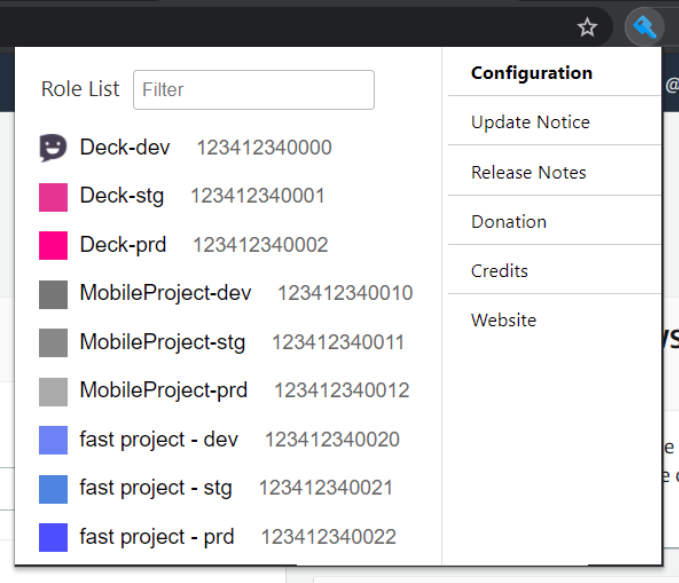
The official docs make it look like people color-code by project × environment, though I'm not organized enough to go that far...
You can also specify a region, which might cut down on those mini heart attacks where your region silently switches to us-east-1 (N. Virginia) and you can't find your instances.
Side Note
AWS account management tends to vary by company or project, though splitting accounts by environment—like prod/stg/dev—seems pretty popular.

Once you do that, the default 5-slot history is bound to be nowhere near enough. I wonder what AWS themselves think about that?
If you're struggling with running out of AWS Switch Role history slots, why not give AWS Extend Switch Roles a try?